
Uma plataforma para seis pessoas muito diferentes
A Active Tracking Platform (ATP) precisava servir seis perfis ao mesmo tempo: a Flex como provedora do serviço, o Admin para visibilidade multinacional, o Logistic Analyst para decisões operacionais, o Shipper para escanear códigos de barras, o Receiver para acompanhar chegadas em tempo real e o Carrier gerenciando transporte e atrasos.
O desafio não era apenas construir um conjunto de funcionalidades — era entender que cada perfil tinha uma relação completamente diferente com os mesmos dados. O Admin quer uma visão por país. O Analyst precisa agir rápido em exceções. O Shipper só precisa escanear e registrar. Desenhar para um era fácil. Desenhar para os seis sem fazer a interface parecer seis produtos diferentes costurados — esse era o problema real.
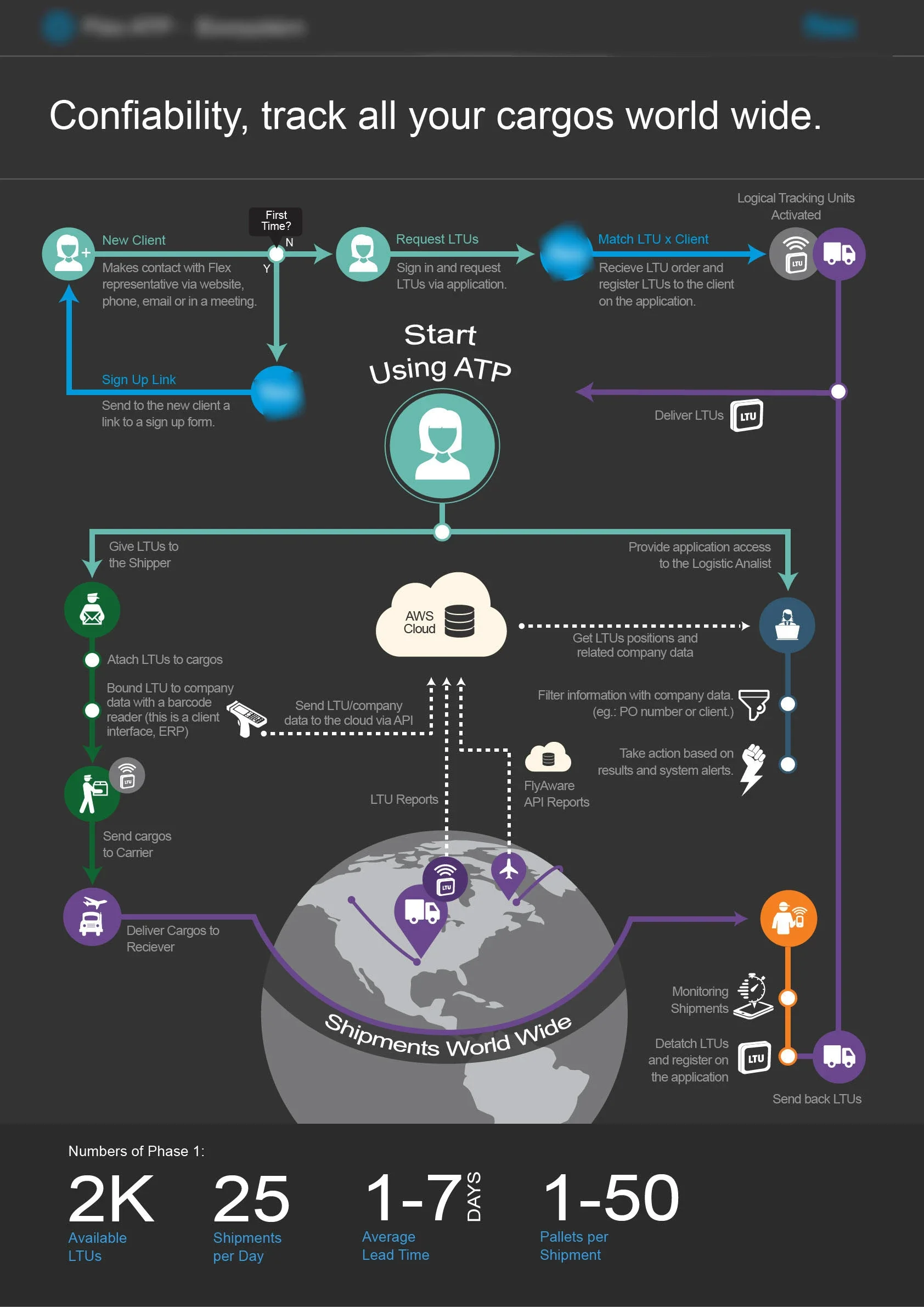
Mapeando a jornada do Analista de Logística
O Logistic Analyst era a persona mais exigente: alguém que usa a plataforma diariamente, em sessões curtas e intensas, de um notebook, que precisa tomar decisões rápidas e identificar atrasos antes que escalem.
O mapa de jornada decompôs nove objetivos em ordem de importância — de "Onde estão minhas cargas?" e "O que chega hoje?" até gerenciar saúde das LTUs, performance de transportadores e preferências do sistema. Cada objetivo foi vinculado a um conjunto de funcionalidades primárias e secundárias, tornando a priorização de features um resultado direto da pesquisa — não uma negociação com stakeholders.
Essa distinção entre funcionalidades primárias e secundárias foi crítica: ela moldou a hierarquia de informação do dashboard e garantiu que as respostas mais importantes estivessem sempre a um clique — não enterradas em um relatório.
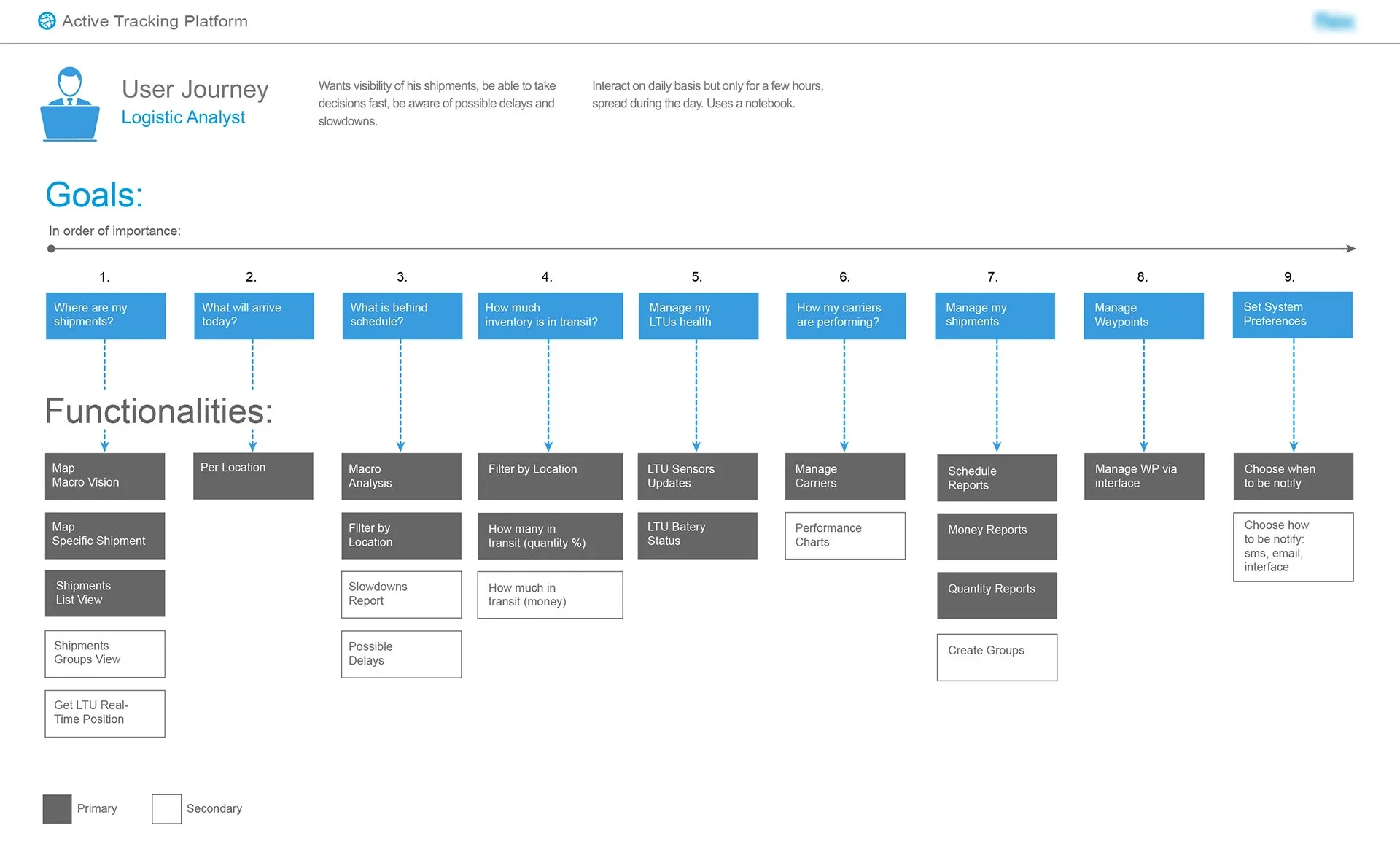
Desenhando o sistema, não apenas as telas
O infográfico do fluxo completo do sistema tornou a complexidade visível antes de qualquer decisão de interface. Ele mapeou cada ator, cada ponto de contato e cada transferência de dados — desde o momento em que um novo cliente entra em contato com a Flex, passa pelo registro da LTU e escaneamento de código de barras, até o embarque mundial e a entrega final.
A camada AWS Cloud no centro do fluxo não era um detalhe técnico — era o princípio organizador. Cada perfil se conecta a ela de forma diferente: Shippers enviam dados via API, Analysts puxam insights e alertas, Receivers confirmam chegadas, Carriers geram eventos de movimentação.
Desenhar nesse nível primeiro significava que as decisões de interface a seguir tinham razão de ser. A estrutura de navegação seguiu os perfis de ator. Os widgets do dashboard seguiram a frequência de decisão. A lógica de alertas seguiu as exceções que de fato custam dinheiro.
Superfícies de decisão, não exibições de dados
O maior erro de UX em interfaces de logística é tratá-las como ferramentas de relatório. Uma tela cheia de dados não é útil se obriga o usuário a interpretar antes de agir.
Cada tela foi desenhada em torno de uma pergunta central: que decisão essa pessoa precisa tomar agora? Para o Analyst, a visão macro no mapa responde "onde estão minhas cargas". O relatório de atrasos responde "o que está em risco hoje". A visão de performance do transportador responde "devo confiar nessa rota amanhã".
A hierarquia visual foi construída para mostrar a resposta antes dos dados — status, depois prioridade, depois detalhe sob demanda.